Quick Answer
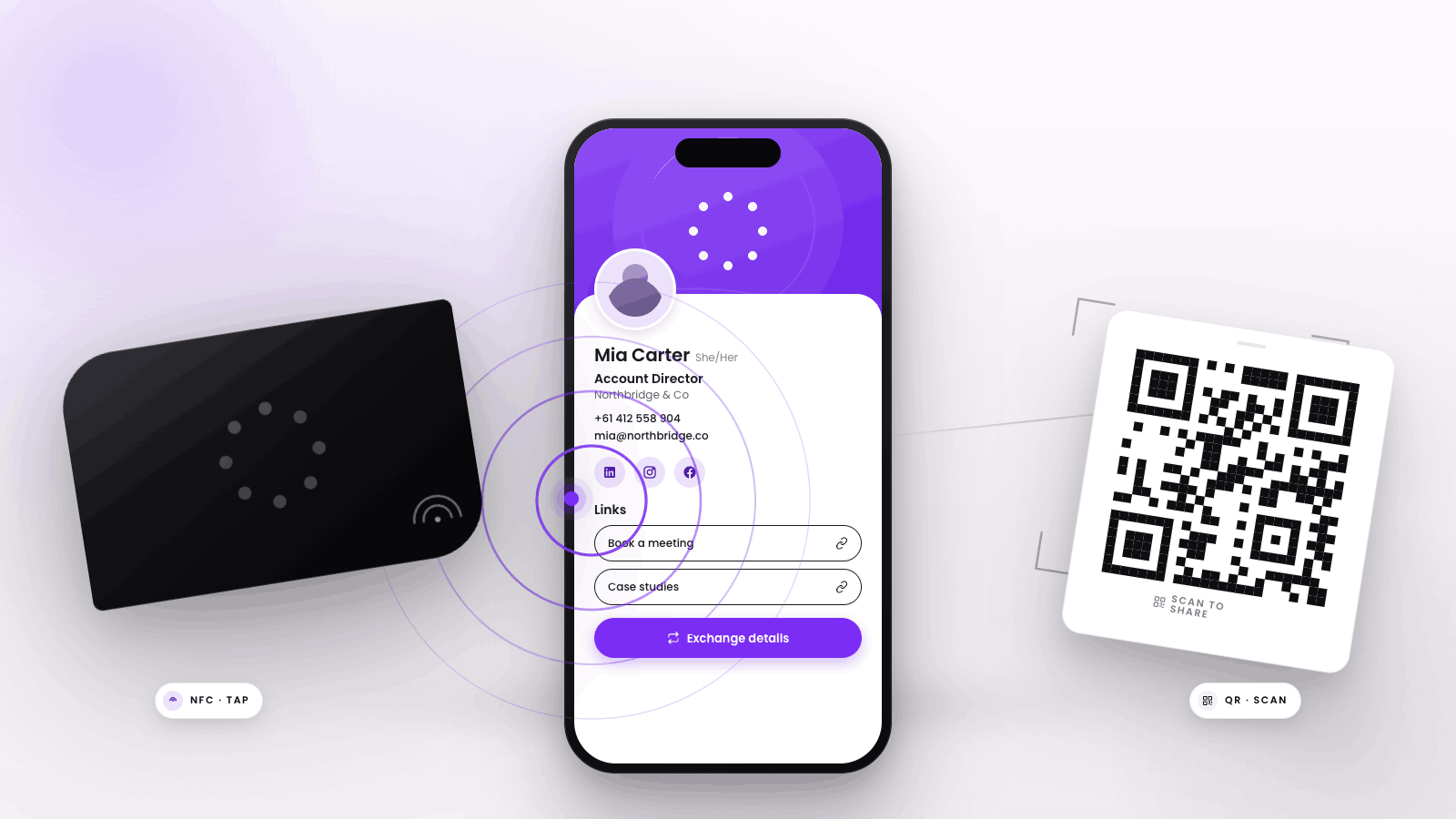
If you're choosing between NFC business cards and QR code business cards, the best method depends on how you want to share and collect contact details. NFC business cards offer a seamless, tap-to-share experience for most modern smartphones, making them fast and impressive in person. QR codes, on the other hand, are accessible with any smartphone camera and work well for printed materials or digital signatures. Both methods can support team rollouts and brand consistency, but NFC cards tend to feel more premium and reduce manual steps. For teams or individuals who want the smoothest in-person exchange, NFC is often easier, while QR codes remain a flexible backup for any device.
Key Takeaways
- NFC business cards let you share your contact profile instantly by tapping your card to a smartphone, no app required for the recipient.
- QR code business cards work by having the recipient scan a printed or digital code with their camera, opening your contact page.
- NFC is typically faster and more impressive in person, but QR codes offer broad compatibility, including with older devices.
- Both methods can support team-wide rollouts, centralized management, and consistent branding.
- NFC cards are harder to lose and can be updated digitally, while QR codes can be printed anywhere or included in digital signatures.
- The best choice depends on your audience, environment, and how you want contacts to save and share details.
How NFC Business Cards work
NFC (Near Field Communication) business cards use a small chip embedded in a physical card. When you tap the card against a compatible smartphone, the phone reads the chip and instantly opens your digital contact profile in the browser. No special app is needed for the recipient, just a modern smartphone with NFC enabled, which is standard on most devices released in recent years. In fact, NFC-capable smartphones are now widespread globally, and the adoption of digital business cards, including both NFC and QR code options, has grown among SMBs and teams seeking to modernize networking, as highlighted by the NFC Forum in 2024.
To learn more about what happens when someone taps an NFC business card, see What Happens When You Tap an NFC Business Card?
Sender experience
- Carry a single NFC card (plastic, metal, or eco-materials) programmed with your digital profile.
- Tap your card to a contact’s smartphone when networking in person.
- Your profile link opens automatically, allowing the recipient to view your details and save them to their phone.
Receiver experience
- Simply unlock their phone and hold it near the card (usually at the top or back of the device).
- No need to open an app or camera; the phone prompts them to open your profile.
- They can save your contact, and, if enabled, share their own details back for lead capture.
Where NFC shines
- Creates a memorable, high-tech impression in face-to-face meetings.
- Reduces friction, no manual typing, searching, or app downloads.
- Supports real-time two-way contact exchange, making follow-up easier.
- Cards can be updated remotely, so your contact info stays current without reprinting.
- Durable and reusable, reducing waste compared to paper cards. For more on the advantages over traditional cards, see What Smart Business Cards Can Do That Paper Cards Can't.
How QR Codes work
QR (Quick Response) codes are two-dimensional barcodes that can be printed or displayed digitally. When someone scans your QR code with their phone’s camera, it opens your digital contact profile. QR codes can be printed on business cards, email signatures, event badges, or even shown on your phone screen.
The accessibility of QR codes is a major advantage. According to eMarketer's 2022 QR Codes Forecast and Trends, the number of U.S. smartphone users scanning QR codes was projected to rise from 83.4 million in 2022 to 99.5 million in 2025, reflecting the broad adoption of smartphone-based QR code scanning.
Sender experience
- Generate a QR code linked to your digital profile.
- Print it on a business card, badge, or display it on your phone or laptop.
- Share by having the recipient scan the code with their camera app.
Receiver experience
- Open their phone’s camera and point it at the QR code.
- Tap the notification that appears to open your contact page.
- Save your details and, if available, submit their own info for follow-up.
Where QR codes shine
- Compatible with any smartphone that has a camera, supporting widespread accessibility.
- Easy to add to printed materials, presentations, or digital assets.
- No physical card required, can be shared virtually or at a distance.
- Useful for event collateral, mass distribution, or remote networking.
- Simple to update by changing the destination link, if using a dynamic QR code.
NFC Business Cards vs QR Codes: side-by-side
When comparing NFC and QR code business cards, several factors matter to buyers: device compatibility, user friction, scalability, and brand presentation. Here’s how they stack up:
| Criteria | NFC Business Cards | QR Code Business Cards |
|---|---|---|
| Device Compatibility | Most modern smartphones; some older devices may not support NFC | Any smartphone with a camera |
| User Friction | Tap to share, no app needed | Open camera, scan code, tap link |
| Scalability | Easy to manage for teams; update profiles remotely | Easy to print and distribute at scale |
| Brand Presentation | Premium, physical, customizable | Flexible, can be digital or printed |
| Edge Cases | May not work with very old phones or if NFC is disabled | Needs good lighting and camera focus; not ideal for quick in-person taps |
Edge cases to consider
- Some older phones or those with NFC disabled won’t read NFC cards, but most in use today support it.
- QR codes need adequate lighting and a steady hand to scan, which can slow down the exchange in dim or fast-paced environments.
- NFC works at very close range (a few centimeters), reducing accidental scans, while QR codes can be scanned from a distance.
When each method is the better choice
NFC business cards are ideal for
- In-person networking where you want to impress and reduce manual steps.
- Teams who value brand consistency and want to manage profiles centrally.
- Environments where durability and reusability matter (trade shows, sales, executive meetings).
QR code business cards are ideal for
- Sharing contact details remotely, in presentations, or via email signatures.
- Events where you need to distribute contact info at scale or to unknown device types.
- Teams who want to include contact sharing on printed collateral or digital assets.
For more on how digital business cards are transforming networking for younger professionals, see Why Paper Cards No Longer Work for Gen Z.
Why not both?
Many teams combine NFC cards with QR codes for maximum compatibility. For example, an NFC card can have a printed QR code as a backup, ensuring everyone can access your profile regardless of device or setting. Using both methods together covers a broader range of devices and user contexts.
Where Tapt fits
Tapt supports both NFC and QR code business card experiences for individuals and teams. You can order NFC-enabled cards that link to your digital profile, and each card or profile can also generate a unique QR code for sharing. Tapt’s platform allows you to manage team profiles, update contact details centrally, and maintain brand consistency across all cards and digital assets. For teams, Tapt provides tools to track contact sharing, export leads, and streamline follow-up, whether contacts are collected via NFC tap or QR scan. Both methods can be used together, giving your team flexibility and broad compatibility.
If you’re looking to capture leads at events, Tapt also offers an Event Badge Scanner for Conferences & Trade Shows that integrates seamlessly with your digital business card strategy.
Bottom line
NFC and QR code business cards both offer significant advantages over traditional paper cards, especially for teams that need to keep contact details current and track networking activity. NFC provides the fastest and most impressive in-person exchange, while QR codes ensure accessibility and flexibility across print and digital channels. For most modern teams, combining both methods delivers the best results, and platforms like Tapt make it easy to manage, brand, and scale your contact sharing strategy.